*MAJOR UPDATE* - USING PHP ONLY WITH NEW CODE! Please view this next post for more information!
So. Google Reader is closing down. I'm not going to get all high and mighty - It's Google's product. They do with it as they wish! There are several places that let you save your feeds from Google Reader, but I wanted to add all my Starred Items from Reader into Pocket. It turns out it wasn't the easiest thing to do! After a few terminal commands and some PHP, this is what I came up with!
Firstly, head to Google Reader, and use the Data Takeout feature that Google provides to save your Reader Data only. The outputted ZIP file should contain a folder entitled "Reader". Within that, there should be a file named "starred.json".
*UPDATE* - I have saved these 2 files to GitHub! Go, Grab!
https://github.com/nickwebcouk/pocketimport
Now the fun begins! To make it easy (and quick) I used the Terminal on Mac and ran these commands within the above folder. I used two files (new.txt and newnew.txt) just to keep track of what was happening. There are easier ways of doing this! I ran the following commands from terminal:
grep -a1 "canonical" starred.json > new.txt
grep -v "^\--" new.txt > newnew.txt
grep -v "} ]," newnew.txt > new.txt
grep -v "\"canonical\" : \[ {" new.txt > newnew.txt
grep -v "\"updated" newnew.txt > new.txt
grep -v "} \]," new.txt > newnew.txt
cat newnew.txt | rev | cut -c 2- | rev > new.txt
cut -c 17- new.txt > newnew.txt
rm -r new.txt
mv newnew.txt url.txt
The " grep " command looks through text files for specific expressions. " cat " outputs a full file, " rev " reverses items, " cut " cuts text, " rm " removes files and " mv " moves files.
To make this easier, I created a Shell Script (Tested on OSX 10.8.2 only)
#!/bin/sh

clear
grep -a1 "canonical" starred.json > new.txt
grep -v "^\--" new.txt > newnew.txt
grep -v "} ]," newnew.txt > new.txt
grep -v "\"canonical\" : \[ {" new.txt > newnew.txt
grep -v "\"updated" newnew.txt > new.txt
grep -v "} \]," new.txt > newnew.txt
cat newnew.txt | rev | cut -c 2- | rev > new.txt
cut -c 17- new.txt > newnew.txt
rm -r new.txt
mv newnew.txt url.txt
You can run that file by saving it to the same location as the Google Reader folder, and running the following in terminal first:
chmod 755 script.sh
./script.sh
the first line tells the computer to allow script.sh to be executed, and the second line executes the script.
I then moved the url.txt file that had just been created to my www root folder (for me its under /users/~name/sites/), and created the following PHP/HTML code:
<!DOCTYPE html>
<html>
<head>
<meta http-equiv="Content-Type" content="text/html; charset=UTF-8" />
<title>Instapaper: Export</title>
</head>
<body>
<h1>Unread</h1>
<ol>
<?php
    $file_handle = fopen("url.txt", "r");
    while (!feof($file_handle)) {
        $galbool = FALSE;
        $line = fgets($file_handle);
        $string = $line;
        $check = $string[strlen($string)-2];
        if ( $check == "/"){
            $string = rtrim($string);
            $string = rtrim($string, "/");
            $desc = $string;
        }
        $gallerycheck = str_replace("/gallery", "", $string, $count);
        if ($count == 1){
            $galbool = TRUE;
            $string = rtrim($string);
            $string = rtrim($string, "/gallery");
            $desc = $string;
        }
        $desc = strrchr($string, "/");
        $desc = str_replace("/", "", $desc);
        $desc = str_replace("-", " ", $desc);
        $desc = ucwords($desc);
        if ($galbool == TRUE){
        $formatted = '			<li><a href="' . $string . '">' . $desc . '[Gallery]</a></li>';
        } else {
        $formatted = '			<li><a href="' . $string . '">' . $desc . '</a></li>';
        }
        echo $formatted;
    }
    fclose($file_handle);
?>
</ol>
</body>
</html>
This provided me with a HTML page, which if saved as instapaper-export.html allowed me to head to getpocket.com and use the Instapaper import option .
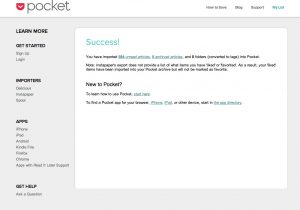
584 starred articles and 2 seconds later, I received this wonderful little message!